
Internal Linking Strategy Example: The Powerful, Proven Playbook for Better Rankings
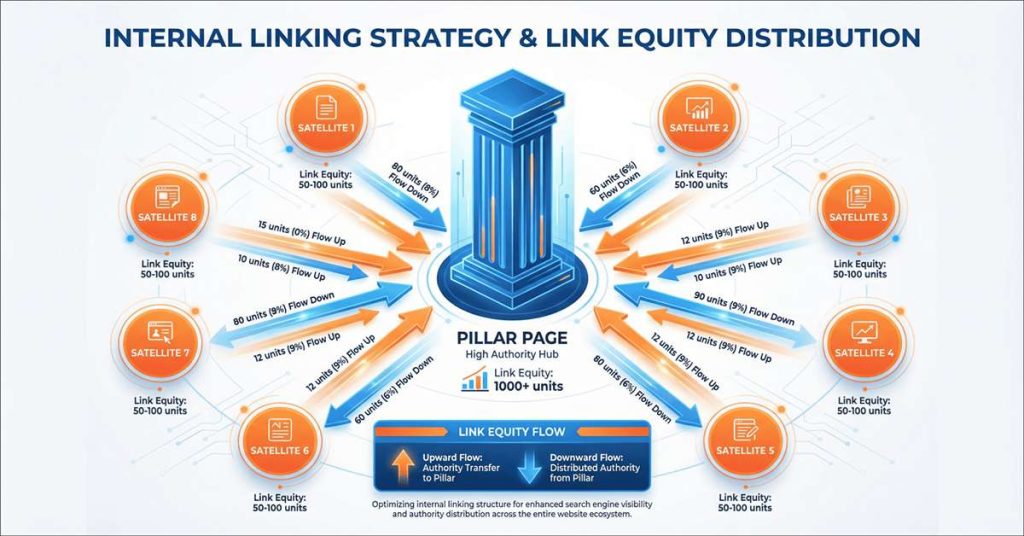
Most sites publish new pages every week. Few connect those pages with care. As a result, the leak stays quiet. Strong content sits buried, and neither readers nor Google can find it.
This guide gives you a working internal linking strategy example you can copy today. First, you will see the map. Next, you will get the rules, a template, and an audit plan. In addition, each section moves from problem to fix to action. Because the steps are small, any team can finish them in a quarter.
Skyline SEO wrote this playbook for US service firms, SaaS teams, and online stores. However, the method fits any site with more than twenty pages. It costs nothing but time, and you control every link.
In short, an internal link connects one page to another page on the same domain. Done well, it guides readers, helps Google crawl the site, and passes authority to pages that earn revenue. Our team at Skyline SEO uses this approach on every audit.
Table of Contents
ToggleWhat Is Internal and External Linking in SEO?
An internal link points from one page on your domain to another page on your domain. In contrast, an external link points to a different domain. Both matter, but they do different jobs.
Internal links shape the structure of your site. They tell Google which pages relate and which pages deserve priority. External links, in contrast, show readers where your facts come from. They build trust when you cite expert sources.
Think of your site as a city. Internal links are the roads between districts. External links are the highways to other cities. Because of that, a city with no roads feels empty, no matter how good the buildings look.
Internal Hyperlinks Versus Navigation Links
Not every link carries equal weight. Menu and footer links appear on every page, so they say little about context. Contextual internal hyperlinks sit inside body copy. Therefore, they tell Google exactly how two topics relate.
For example, a paragraph about title tags can link to our guide on on page SEO basics for page titles. The reader gets the next step. Google gets a clear topic signal.
Where External Links Fit
Cite a source whenever you share data. Also check that every link is crawlable. Google explains the rules in its guidance on crawlable links in Google Search Central. Apply that advice to each template on your site.
Why Internal Linking SEO Still Wins in 2026
Backlinks need outreach, budget, and luck. Internal links, however, need only a clear plan. That makes them the fastest lever for most small teams.
The best known dataset comes from Zyppy. Its 23 million internal links study covered about 1,800 sites and roughly 520,000 URLs. Several 2026 roundups repeat its headline finding. Also, pages with 40 to 44 internal links earned about four times more Google clicks. The comparison group had only zero to four links.
Those same summaries report a drop in traffic after roughly 45 to 50 links. So more is not always better. Quality and relevance still decide the outcome.
How Links Pass Authority and Help Crawling
Google finds new pages by following links. Therefore, a page with no inbound links is hard to reach. In addition, a page with many relevant links gets crawled more often.
Links also pass authority. Your homepage usually holds the most. When it links to a hub, the hub gains weight. Then the hub shares that weight with each cluster page. This is why a strong internal linking strategy example always starts at the top of the site.
Crawl depth matters too. Also, pages buried six clicks deep get little attention. As a result, important pages should sit within three clicks of the homepage.
Latest Internal Linking Statistics at a Glance
|
Statistic |
Source |
How to use it |
|
23 million internal links analyzed across about 1,800 sites |
Zyppy |
Treat it as the largest public dataset, then test on your own site. |
|
Pages with 40 to 44 internal links earned about 4x more clicks than pages with 0 to 4 |
Zyppy, as reported in 2026 roundups |
Raise links to priority pages that have almost none. |
|
534,888 links studied across 38 SaaS sites |
Indie Hackers study |
Use four contextual links as a working target, not a guarantee. |
|
Googlebot crawl coverage rose from 40% to 70% on one large site after a linking rewrite |
JetOctopus case study, reported by Digital Applied, May 2026 |
Use it to justify a crawl focused audit. |
All figures are global. For US sites, add one more check. Filter Google Search Console to the United States, then see which pages already earn local clicks. Link from those pages to your money pages first.
What the Data Does Not Prove
Teams often link more to pages they already value. So a page with many links may rank well for other reasons. Moreover, the Indie Hackers authors say this plainly. Their data is observational, and four links is a useful target rather than a ranking guarantee.
Reddit threads on this topic argue about magic link counts. Ignore the noise. Instead, aim for relevance, natural variety, and clear paths from hub to cluster.
Internal Linking Strategy Example: The Hub and Cluster Model
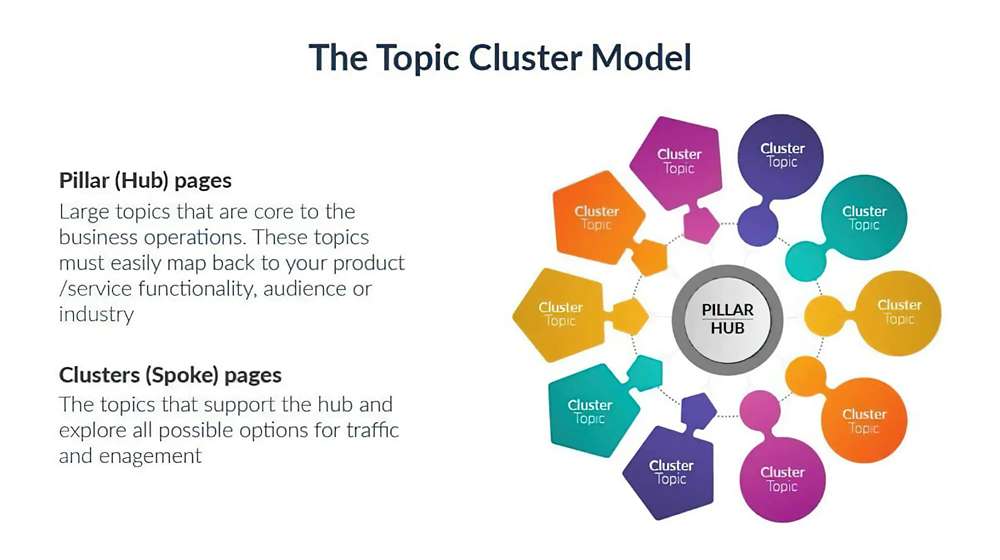
Here is the internal linking strategy example we use with clients. Note that the site is a fictional US home services firm. The numbers below are illustrative, not client results.
Because this model is easy to copy, we start here. In addition, the hub page targets one broad topic. In this case, it is water heater repair in Dallas. Five cluster pages cover narrow subtopics, such as repair cost, signs of failure, and tank versus tankless units.
Build the Internal Linking Map
An internal linking map is a simple sheet. It lists every hub, every cluster, and every link between them. So draw it before you write a single anchor. These four rules keep the map clean:
- The hub links down to every cluster page once, inside body copy.
- Each cluster links up to the hub, using the main topic as anchor text.
- Each cluster links sideways to two close siblings only.
- One cluster page links to a service page with a clear call to action.
Also, this pattern keeps every page within three clicks of the homepage. Moreover, it gives each cluster page at least four contextual links. Give each service one target page, because competing pages cause keyword cannibalization and split your rankings. That matches the working target from the SaaS study above.
Internal Link Visualization
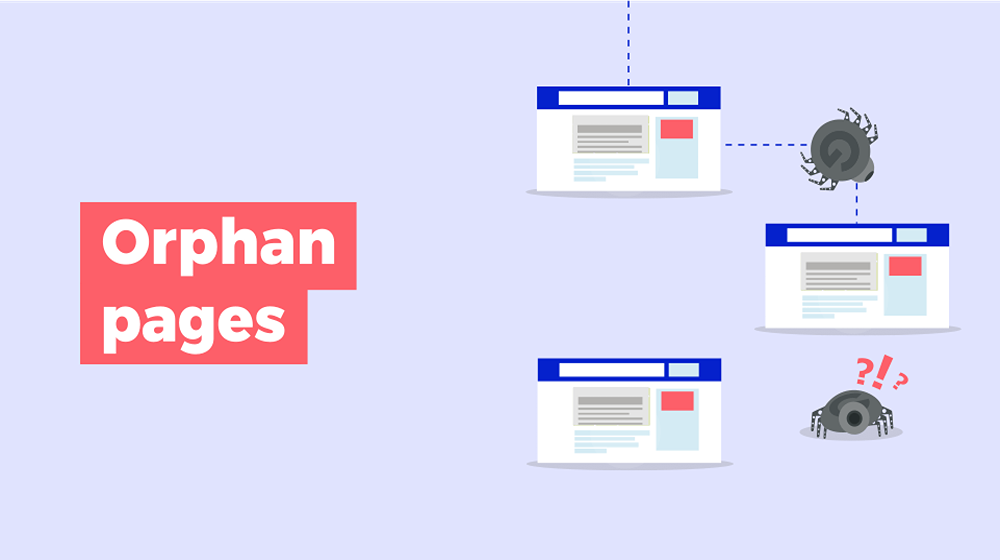
A map becomes useful when you can see it. Internal link visualization tools draw your site as dots and lines. Screaming Frog, for instance, offers crawl diagrams for this purpose. Isolated dots are orphan pages. Heavy knots show over linking. So fix the isolated dots first.
Anchor Text Rules That Hold Up
Anchor text is the clickable part of any internal linking strategy example. It tells Google what the target page covers. Follow these rules:
- Describe the target page in three to six words.
- Vary the wording. Do not repeat one exact anchor across dozens of pages.
- Avoid vague anchors such as click here or read more.
- Match the anchor to the intent of the target page.
Zyppy has also posted an update. It notes that some sites with very high anchor diversity may suffer. So keep variety natural, not forced. In short, write anchors for people first. Image links work differently. They use alt text as the anchor, so read our guide to image optimization in SEO.
Where to Place Links on the Page
Place the first link in the opening third of the page. Also, readers and crawlers meet it early. Add later links where the topic branches. Never stack five links in one paragraph, because the reader will skip them all.
Linking Strategies Compared: Which One Fits Your Site?
Several linking strategies exist. Moreover, each suits a different site. The table below compares the three most common.
Strategy | Best for | Main risk |
Hub and cluster | Blogs, SaaS sites, and service firms with many related topics | Clusters drift off topic if nobody reviews them. |
Strict silo | Large stores with clear category trees | Rigid rules block useful links between silos. |
Navigation only | Very small sites under ten pages | Pages lack context, so Google learns little. |
For most readers, we recommend the first option. It balances control and flexibility. Moreover, it is the model behind our main internal linking strategy example above. Start there, and add silo rules only when the site grows.
Internal Linking Strategy Template for Your Team
Copy the table below into a sheet. Fill one row for every link you plan to add. Then review the sheet once each quarter. Also, share it with every writer on the team. This internal linking strategy template works for blogs, stores, and SaaS sites.
Source page | Target page | Anchor text | Placement | Status |
Blog post on site audits | What is technical SEO | technical SEO checklist | Paragraph 2 | Planned |
Blog post on audits | Content pruning guide | prune thin pages | Paragraph 5 | Planned |
Service page | Case study page | see the results | After intro | Live |
Case study page | Contact page | request an audit | Final block | Live |
Rules for Every Page
- Link to the hub within the first 200 words.
- Add three to five contextual links per 1,000 words.
- Use descriptive anchors that match the target topic.
- Check that each target returns a 200 status code.
- Update older posts whenever you publish a related new post.
Rule five is the one teams forget. New posts link out easily. However, old posts rarely link in. So set a reminder to revisit three older posts after every publish date.
Internal Linking Strategy Example for Ecommerce and Local Sites
Online stores need a different shape. Category pages act as hubs. Product pages act as clusters. Buying guides connect the two.
Here is a short internal linking strategy example for a US store that sells running shoes. Also, the category page, Trail Running Shoes, links to every product. Each product links back to the category. In addition, a buying guide links to both. Finally, a sizing page links to every product in the category.
Local firms follow the same logic. Also, a city page links to service pages. Each service page links to reviews and a booking page. Also add links between nearby city pages when the service overlaps. This helps Google read your service area.
SaaS Internal Linking: An Internal Linking Case Study
SaaS sites face a special problem. They publish docs, feature pages, integrations, and blog posts. Often, these groups never meet.
The Indie Hackers team reviewed 534,888 links across 38 SaaS sites. They built a six step audit from the findings. You can read the details in the full SaaS internal linking study.
A Worked Example for a US Invoicing App
Imagine an invoicing app with 120 pages. Moreover, the blog has 60 posts, yet only eight link to the pricing page. Feature pages link nowhere. Docs sit alone.
First, list the ten pages that drive the most trial signups. Next, find posts that mention those features. Then add one contextual link from each post. In one afternoon, forty new links go live. Finally, track signups from those posts for 60 days.
This example is illustrative. Still, the workflow is real, and you can run it in a week. Pair it with our advice on writing an SEO friendly blog post. Then every new post ships with links already planned.
Best Internal Linking Strategy: Fix These Problems First
Adding links is easy. Fixing broken structure is harder, and it pays more. Therefore, work through these problems in order.
Problem: Orphan Pages
An orphan page has no internal links. Google may never find it. To fix this, export all URLs from your sitemap and crawl the site. Compare the two lists. Then link each orphan from a relevant page.
Quick Test
Search Google for your domain plus a distinctive phrase from the page. If nothing returns, the page likely needs links and indexing.
Problem: Weak Pages Soak Up Links
Old posts with no traffic waste link equity. Review them with a content pruning process. Then merge, redirect, or refresh each one.
Problem: Redirect Chains and Broken Links
Each redirect adds delay. Also, each broken link adds a dead end. Run an SEO audit and update every link to its final URL.
Problem: Slow Pages Hurt the Journey
Even perfect links fail on slow pages. Visitors leave before they click. Check your Core Web Vitals and fix the worst templates first. A solid technical SEO base supports every link you add.
Problem: Weak Trust Signals
Links to author pages and cited sources support EEAT. Our explainer on understanding EEAT in SEO shows how experience and trust fit together. Add author links to every post.
Internal Link Tool and Internal Link Manager Options
You can run this plan with a spreadsheet. Still, a good internal link tool saves hours. Use these options to run the internal linking strategy example above:
- Google Search Console: the Links report shows your most linked pages. It is free.
- Screaming Frog SEO Spider: crawls the site, lists inlinks, and draws diagrams.
- Ahrefs Site Audit and Semrush Site Audit: flag broken links and orphan pages.
- Yoast SEO Premium: suggests related posts while you write in WordPress.
For quick page checks, try our walkthrough on using SEO Meta in 1 Click. In addition, an internal link manager plugin can also automate suggestions. However, review each suggestion by hand. Automated links often miss context. So pick one tool and learn it well.
Ninety Day Plan for Improving Internal Links
A plan beats good intentions. Use this ninety day internal linking strategy example in three phases. Also, each phase has one clear goal.
Days 1 to 30: Audit the Current Links
First, crawl the site. Then export inlink counts for every URL. Flag orphans, broken links, and pages with fewer than three contextual links. Then rank your money pages by revenue.
Days 31 to 60: Build the Missing Links
Next, add links from strong pages to weak money pages. Use varied anchors. Include long tail phrases, because long tail keywords often convert better. Ecommerce teams can also review keyword research for ecommerce.
Days 61 to 90: Measure and Refine
Next, compare clicks, impressions, and average position in Search Console. Track conversions from linked pages. Keep what works, but remove links that confuse readers. Finally, document the new rules in your on page SEO best practices checklist.
How to Measure Results
Pick three numbers before you start. Track clicks to hub pages, crawl requests in Search Console, and conversions from linked pages. Record the baseline first. Then, compare after 30, 60, and 90 days.
Be patient, because Google needs time to recrawl and reassess. Moreover, other changes can blur the picture, so log every site update. If rankings rise on pages you linked and stay flat elsewhere, your internal linking strategy example is working.
Service firms can take this further with our guide to an SEO strategy for service businesses in the USA. It shows how local intent shapes every cluster.
Frequently Asked Questions About Internal Linking
How many internal links should one blog post have?
Start with three to five contextual links per 1,000 words, as in our internal linking strategy example. Adjust by topic depth. Relevance matters more than the count.
Should internal links open in a new tab?
Usually not. Same tab links keep the journey simple. Use a new tab only for tools or downloads.
Do nofollow internal links help?
Rarely. Nofollow on internal links can waste authority. Use it only for pages such as login or cart screens.
Can too many internal links hurt rankings?
Yes. Crowded pages dilute attention and confuse readers. Summaries of the Zyppy data report a traffic decline after about 45 to 50 links.
How often should I audit internal links?
Run a light check monthly and a full crawl each quarter. Also audit after any site migration.
Key Takeaway and CTA
The best internal linking strategy example is simple. Build a hub, connect clusters, use clear anchors, and review every quarter. Start with orphan pages. Then lift your money pages. Track results for 90 days.
Ready to apply this internal linking strategy example to your own site? Visit Skyline SEO for a tailored audit. You can also explore more guides on the Skyline SEO blog.