
Improve Your Website With Core Web Vitals | A Complete Guide

Ever wondered how Google decides whether a website actually deserves a high ranking. Core Web Vitals sit near the center of that judgment. These three metrics capture the real experience a visitor has on a page, covering load speed, responsiveness, and visual steadiness.
Therefore, this guide explains how to improve your website with Core Web Vitals in plain terms. You will see what each metric measures, why Google weighs it, and which fixes genuinely move the numbers. Every recommendation here suits a business owner, a marketer, or a developer working on a live site.
In fact, core web vitals SEO in 2026 is no longer a purely technical concern. It shapes rankings, bounce rates, and revenue together. Core web vitals SEO importance in 2026 keeps rising as Google leans harder on real user data. Let us look at how these metrics work and why they matter so much right now.
Table of Contents
- What Are Core Web Vitals
- Why Core Web Vitals Matter for SEO
- Global Stats and Market Trends 2026
- Key Changes Shaping Core Web Vitals Now
- The Exact Thresholds You Need to Hit
- Monitoring Performance Properly
- How to Improve Largest Contentful Paint
- How to Reduce Cumulative Layout Shift
- How to Improve Interaction to Next Paint
- Early Hints and Advanced Loading Strategies
- How Core Web Vitals Fit Into Wider SEO
- Common Mistakes That Hurt Performance Scores
- Tools Worth Using
- Core Web Vitals on WordPress
- Building Performance Into Your Workflow
- Frequently Asked Questions
- Final Thoughts
1. What Are Core Web Vitals
Core Web Vitals form a small group of metrics that measure how a real person experiences a web page. They focus on three questions. How quickly does the main content appear. Does the layout hold steady while loading. Finally, how fast does the page answer a tap or a click.
Three primary metrics carry the whole framework.
Largest Contentful Paint
Largest Contentful Paint, usually shortened to LCP, measures how long the biggest visible element takes to appear. That element is often a hero image, a video thumbnail, or a large block of text. In practice, a visitor treats that moment as the point where the page has genuinely loaded.
Cumulative Layout Shift
Anyone asking what is cumulative layout shift can start here. Cumulative Layout Shift, written as CLS, measures how much the layout jumps around during loading.
Consequently, a high score frustrates people badly. Anyone who has tried to tap a button, only to watch an advertisement push it sideways, has felt a poor CLS score first hand.
Interaction to Next Paint
Interaction to Next Paint, shortened to INP, measures how long a page takes to show a visible response after someone interacts with it. Each of these three metrics affects the real user experience directly, which in turn shapes how the page performs inside Google Search.
2. Why Core Web Vitals Matter for SEO
Improving your website with Core Web Vitals matters because Google folds these scores into its ranking systems. A site that performs well across all three stands a genuinely better chance of ranking higher, which brings more traffic and stronger visibility over time.
Furthermore, Google also wants to send its users somewhere pleasant. A page that loads quickly and holds its layout steady keeps visitors around longer. Lower bounce rates and higher conversions tend to follow naturally from that stability.
Moreover, page speed carries a commercial weight that many teams underestimate. Research from Google found that trimming mobile load time by a tenth of a second lifted conversions by roughly 8 percent on retail sites and around 10 percent on travel sites. Small technical gains translate into real money.
Technical performance also supports the wider work covered inside our technical SEO guide, since a slow site undermines even excellent content.
3. Global Stats and Market Trends 2026
Indeed, real measurement data shows exactly how much room most websites still have.
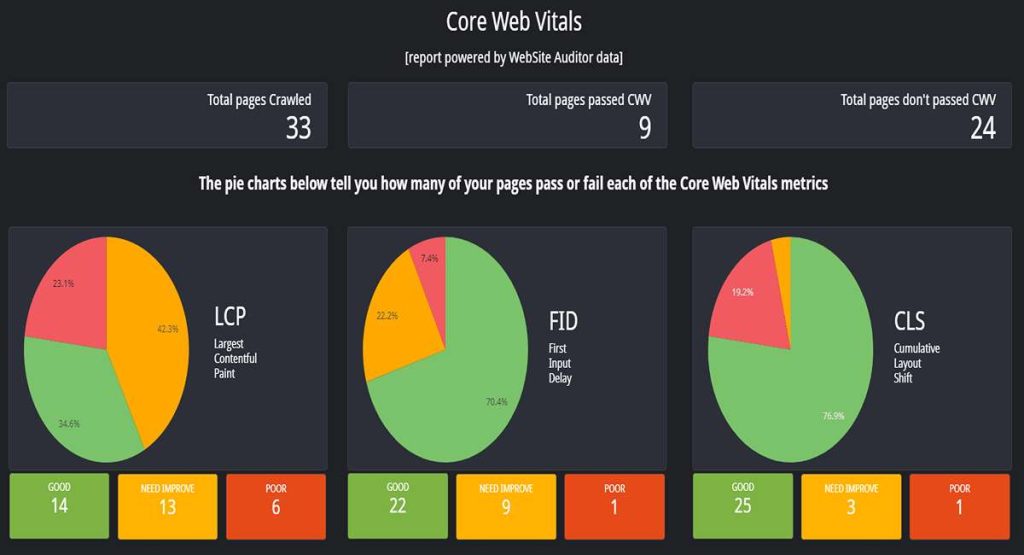
According to the 2025 Web Almanac from HTTP Archive, only 48 percent of mobile origins pass all three Core Web Vitals thresholds. Desktop performs better at roughly 56 percent, though a gap that wide still means around half the web fails a test that directly influences search visibility.
Meanwhile, pass rates have climbed steadily, which is genuinely encouraging. Mobile figures rose from 36 percent in 2023, to 44 percent in 2024, and reached 48 percent through 2025. Desktop followed a similar curve, moving from 48 percent up to 56 percent across the same stretch.
However, LCP remains the hardest metric for most sites to clear. INP, by contrast, passes on roughly 97 percent of desktop origins, yet drops toward 77 percent on mobile. That split reveals how poorly many sites handle interactivity on phones, where processors are slower and connections vary.
4. Key Changes Shaping Core Web Vitals Now
In addition, several shifts have reshaped this area over the past two years.
INP Has Fully Replaced FID
Interaction to Next Paint became the official responsiveness metric on 12 March 2024, replacing First Input Delay completely. Any guide still listing FID as a current Core Web Vital is out of date.
FID only measured the delay before the very first interaction. INP measures responsiveness across every interaction in a session, then reports something close to the worst one, which makes it considerably harder to pass.
Scores Come From Real Visitors
Importantly, Google grades a page using field data from the Chrome User Experience Report, not a lab test. A flawless score inside developer tools means little when a quarter of real visitors on mid range phones get slow results. Passing requires at least 75 percent of real visits to hit the good threshold.
Mobile Carries More Weight
Mobile browsing is now the default for most audiences. Consequently, those scores carry real weight inside search rankings, and mobile remains considerably harder to pass than desktop.
Measurement Windows Move Slowly
The Chrome User Experience Report updates across a rolling 28 day window. Therefore, patience matters after shipping a fix, since several weeks may pass before the change shows up in reported data.
Better Tooling Keeps Arriving
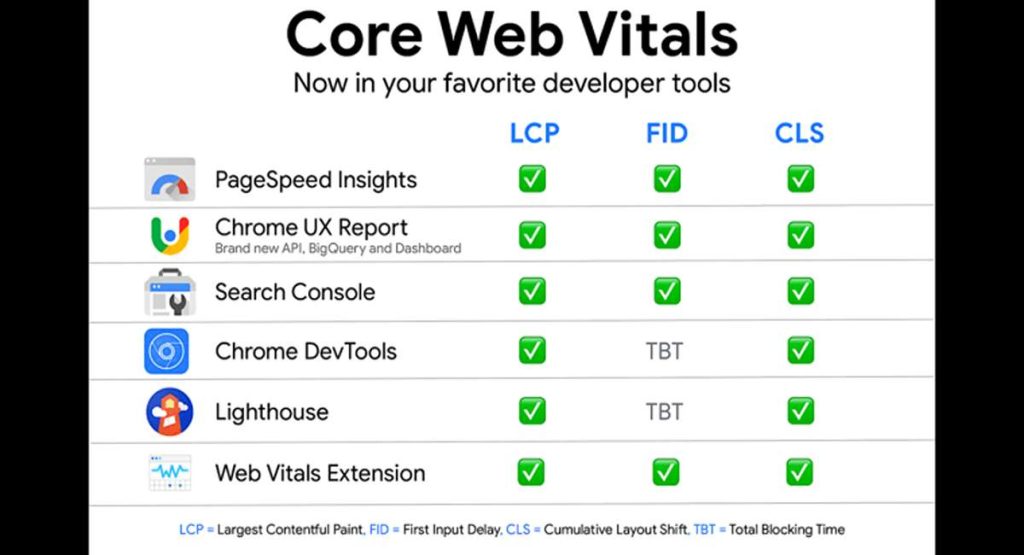
PageSpeed Insights, the Chrome UX Report, Search Console, and the Web Vitals browser extension all remain central to monitoring. AI assisted diagnostics have also started surfacing inside several performance tools, speeding up the hunt for root causes.
5. The Exact Thresholds You Need to Hit
Core web vitals thresholds set LCP at 2.5 seconds, CLS at 0.1, and INP at 200 milliseconds. Each metric carries three bands, and Google measures every one at the 75th percentile of real visits.
- LCP should land at or under 2.5 seconds. Anything between 2.5 and 4.0 seconds needs improvement, while anything past 4.0 seconds rates as poor.
- INP should land at or under 200 milliseconds. A result between 200 and 500 milliseconds needs improvement, and anything beyond 500 milliseconds rates as poor.
- CLS should sit at or under 0.1. A score between 0.1 and 0.25 needs improvement, and anything above 0.25 rates as poor.
Notably, these numbers stay identical across mobile and desktop. Mobile simply proves much harder to pass in practice.
6. Monitoring Performance Properly
Tracking these scores is the single most important habit for keeping a site healthy. Anyone wondering what is real user monitoring can think of it simply. Real user monitoring, often shortened to RUM, shows what actual visitors experience rather than what a synthetic test predicts.
For instance, tools such as mPulse let a team watch performance broken down by device type and audience segment. That breakdown gives a complete picture across LCP, CLS, and INP together.
Slow load times and layout shifts become easy to locate, which turns a vague performance complaint into a specific, fixable problem.
In short, field data should decide whether a page passes. Lab data then helps diagnose exactly why a failure happened. Search Console and PageSpeed Insights both surface real Chrome user numbers, while Lighthouse and browser developer tools help reproduce individual issues locally.
7. How to Improve Largest Contentful Paint
Anyone asking how to improve core web vitals should start with LCP. Fortunately, core web vitals optimization here responds well to a handful of targeted changes.
- Make sure the LCP element appears directly in the HTML source rather than loading through JavaScript. A search engine and a browser both need to discover it early.
- Next, preload the hero image so the browser fetches it immediately instead of waiting.
- Additionally, serve content through a Content Delivery Network. A CDN caches files across servers worldwide, so a visitor in Texas and a visitor in Berlin both receive content from somewhere nearby.
- Improve server response time, measured as time to first byte. A slow first byte delays everything that follows. Server side caching, better hosting, and fewer database queries all help here.
- Likewise, remove render blocking resources. Deferring non critical JavaScript and inlining critical CSS both let the main content paint sooner.
Compress and correctly size every image. Our guide to image optimization covers this process in full detail, since oversized images remain the most common single cause of a failing LCP score.
8. How to Reduce Cumulative Layout Shift
Although layout shift hits mobile visitors hardest, the fixes stay refreshingly simple.
- Set explicit width and height attributes on every image and video. The browser then reserves the correct space before the file arrives.
- Similarly, reserve space for advertisements, embeds, and iframes ahead of time. Anything injected later should never push existing content sideways.
- Also, load web fonts asynchronously, and specify a fallback font with similar metrics. Text that swaps fonts mid load causes a surprising amount of visible movement.
- Avoid inserting dynamic content above existing content. A banner that appears at the top of a page shoves everything below it downward, which registers immediately as a shift.
9. How to Improve Interaction to Next Paint
INP rewards disciplined JavaScript work more than anything else.
- Break up long tasks. Any single task running past 50 milliseconds blocks the main thread and delays a visible response.
- Furthermore, reduce total JavaScript payload. Shipping less code remains the most reliable improvement available.
- Meanwhile, defer work that does not need to happen immediately. Analytics calls, third party widgets, and non essential scripts can all wait.
- Use a web worker for heavy computation, which moves that work off the main thread entirely.
- Prioritise rendering the visual response before finishing background work. A visitor needs to see something change quickly, even when processing continues underneath.
10. Early Hints and Advanced Loading Strategies
HTTP 103 Early Hints lets a server tell a browser which resources to start fetching while the main response is still being prepared. That head start can meaningfully reduce LCP on slower connections.
Similarly, resource hints such as preconnect and dns prefetch also help. Each one shaves latency off a connection the browser will need shortly. Used carefully, these small directives compound into a noticeably faster experience.
11. How Core Web Vitals Fit Into Wider SEO
Google folds these metrics into its wider page experience signals, treating them as one genuine input among many. A page with weak scores faces a real disadvantage, while a fast, stable page gains a modest but meaningful edge.
However, content quality still matters more. A blazing fast page with thin content will not outrank a slower page that answers the question properly. Performance works best as an amplifier for content that already deserves to rank.
That balance connects directly to the wider on page SEO practices covered across our guides, and to the E-E-A-T signals Google uses to judge genuine quality.
A full SEO audit usually surfaces performance problems alongside content and link issues, which makes it a sensible starting point for any site facing unexplained ranking trouble.
12. Common Mistakes That Hurt Performance Scores
Knowing how to fix core web vital issues starts with knowing what causes them. Unfortunately, several habits quietly damage these scores across otherwise well built sites.
- Chasing a single Lighthouse number instead of the three field metrics underneath it.
- Installing multiple performance plugins that duplicate work and sometimes conflict outright.
- Uploading images straight from a camera or a stock library without compression.
- Adding third party scripts without ever auditing their real cost.
- Testing only on fast office broadband and modern hardware, which hides the experience most mobile visitors actually get.
- Judging a fix too quickly, before the 28 day measurement window has caught up.
13. Tools Worth Using
A short, well chosen toolkit covers almost everything a team needs here.
- PageSpeed Insights combines real field data with a lab test in one free report. It remains the fastest way to see whether a specific page passes.
- Google Search Console groups pages by status across an entire site. That grouping matters, because fixing one template often repairs hundreds of pages at once.
- Meanwhile, Lighthouse, built into Chrome developer tools, helps reproduce and debug a specific problem locally.
- The Chrome UX Report supplies the underlying field dataset Google uses for its own assessment.
- Additionally, the Web Vitals browser extension shows live scores while browsing, which makes casual spot checks effortless.
- Finally, WebPageTest offers deep waterfall analysis for anyone chasing a stubborn, hard to isolate issue.
Start with field data from Search Console to find which templates fail. Then switch to Lighthouse or WebPageTest to understand precisely why.
14. Core Web Vitals on WordPress
WordPress core web vitals deserve their own treatment, since the platform powers a large share of the web. A few habits specific to core web vitals WordPress setups make a real difference.
- Choose a lightweight theme. A bloated theme loading six font families and a heavy page builder creates problems no plugin fully solves later.
- Likewise, limit plugin count deliberately. Every active plugin adds queries, scripts, or stylesheets. Auditing the list every few months usually reveals several that nobody actually uses.
- Additionally, use one caching plugin, never several. Overlapping caching layers frequently conflict and occasionally break a site outright.
- Convert images to WebP format and compress them before upload. Several plugins automate this across an entire media library.
- Finally, host somewhere capable. Cheap shared hosting often produces a slow Time to First Byte that no amount of front end work can rescue.
Anyone writing content on the platform will also find our guide to SEO friendly blog posts useful, since structure and performance reinforce each other.
15. Building Performance Into Your Workflow
Treating performance as a one time project rarely works. Scores drift as new content, plugins, and third party tools arrive.
- Check Search Console monthly rather than annually. A slow slide is far easier to reverse early.
- Similarly, test any new plugin or script against a before and after measurement. Anything that materially damages a score deserves a second look.
- Furthermore, set a simple performance budget. A rough page weight limit gives a whole team a shared, concrete target.
- Review the media library quarterly. Large images accumulate quietly, especially across sites with multiple content contributors.
16. Frequently Asked Questions
Q1. How do I improve my Largest Contentful Paint score
Compress and resize images, serve files through a CDN, improve server response time, preload the hero image, and remove render blocking JavaScript.
Q2. What reduces Cumulative Layout Shift most effectively
Set explicit dimensions on images and advertisements, reserve space for embeds, load fonts asynchronously, and avoid inserting dynamic content above existing elements.
Q3. Why does Interaction to Next Paint matter so much
INP measures how quickly a page responds to every interaction, not just the first one. Visitors notice delay immediately, so responsiveness shapes both satisfaction and conversion.
Q4. Do Core Web Vitals genuinely affect rankings
Yes. Google confirms these metrics as ranking signals, though they work alongside content quality rather than replacing it.
Q5. Is First Input Delay still a Core Web Vital
No. INP replaced FID entirely on 12 March 2024. Any resource still citing FID as current needs updating.
Q6. How long before a fix shows up in reported scoresQ
Field data updates across a rolling 28 day window, so allow several weeks before judging whether a change worked.
17. Final Thoughts
Improving your website with Core Web Vitals is a genuinely worthwhile step toward stronger search visibility. Attention to Largest Contentful Paint, Cumulative Layout Shift, and Interaction to Next Paint together produces a faster, steadier site that both ranks better and holds attention longer.
To begin with, start by measuring honestly. PageSpeed Insights and Search Console both reveal where real visitors struggle. Fix whichever metric sits in the poor band first, then work through the rest in order of commercial impact.
In short, progress here compounds quietly. Each improvement lifts user experience, and stronger experience gradually lifts rankings alongside it.
Need help with the technical side. Performance problems often hide deep inside a theme, a plugin stack, or a hosting configuration. Explore our SEO services at Skyline SEO, or browse more practical guides across the Skyline SEO blog.