
How to Evaluate Google Ads Performance: | A Complete 2026 Guide
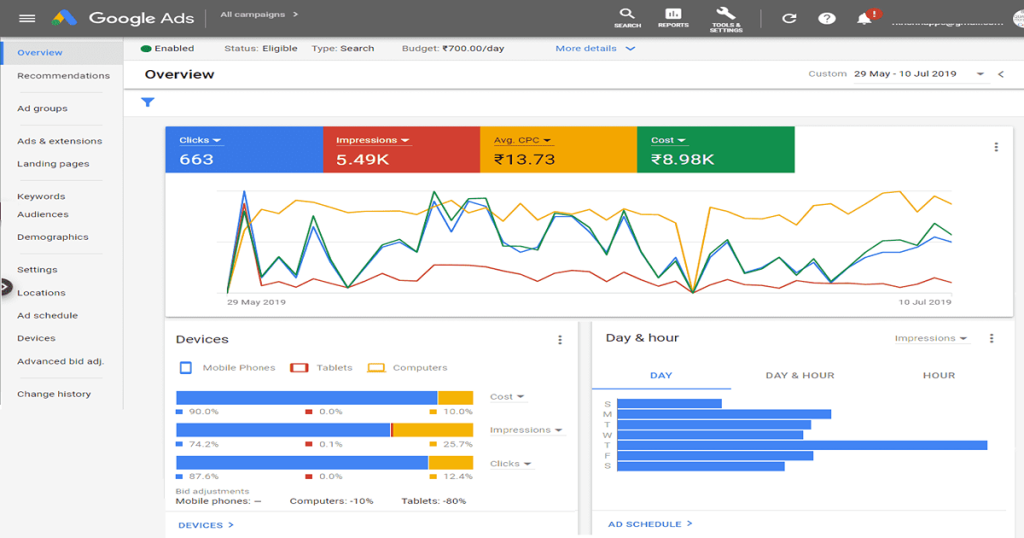
Starting a Google Ads campaign takes little effort. Reading the results in a way that actually guides better decisions takes real skill. At Skyline SEO, we support businesses that want growth based on data rather than guesswork. Many brands spend most of their energy launching new campaigns. Businesses that grow steadily instead spend real time reviewing what those campaigns already show.
Google Ads still ranks among the most rewarding channels in online marketing. The company often cites an average return near two dollars in revenue for every dollar spent. That figure has appeared across several Economic Impact reports. Even so, that average only holds true for accounts that track results with care.
Learning to evaluate Google Ads performance well protects budget. It also lifts return on investment and supports growth that can scale. Plenty of businesses run ads. Far fewer study the numbers with real discipline. This guide sets out a clear, practical path, built around the metrics that matter and the habits that separate accounts that improve from accounts that stall. Review results weekly at minimum, then again each month and each quarter, so a shift gets caught early.
Table of Contents
- Why You Should Evaluate Google Ads Performance in 2026
- Digital Advertising Trends and Market Data for 2026
- Nine Core Google Ads Metrics and KPIs to Track
- A Simple Process to Evaluate Google Ads Performance and Share the Data
- Using the Google Ads Report and Transparency Library
- Google Ads Optimization: Practical Ways to Improve Performance
- Google Ads vs Facebook Ads: Which Performs Better
- Mistakes That Distort How Businesses Evaluate Google Ads Performance
- Building a Simple Weekly Review Habit
- Frequently Asked Questions
- Final Thoughts and Call to Action
1. Why You Should Evaluate Google Ads Performance in 2026
Paid search has grown more crowded every year, and 2026 is no exception. That is exactly why so many businesses now evaluate Google Ads performance far more often than they once did. Automated bidding has reshaped this landscape. So have systems built around AI and stricter privacy rules. A few forces explain why careful evaluation now matters more than it once did:
- Cost per click keeps climbing across most industries.
- Bidding systems built on AI need clean, well organised data to work properly.
- Privacy rules have reduced how much a business can track directly.
- Auctions for search terms have grown more competitive.
- Performance Max Google Ads campaigns bundle several channels together, so they need a deeper level of analysis to read correctly.
In short, success in 2026 depends far less on instinct and far more on reading the numbers with real judgement. A business that only checks results once a quarter now competes against rivals who evaluate Google Ads performance every week. The gap between careful accounts and neglected ones keeps widening as a result.
2. Digital Advertising Trends and Market Data for 2026
Any honest evaluation of Google Ads starts with a sense of the wider market. According to 2026 global digital advertising data published by Statista, global spending on digital advertising is forecast to pass 950 billion United States dollars during the year. That figure makes up around 70 percent of total global ad investment. Alphabet, the parent company of Google, generated roughly 209 billion United States dollars in digital ad revenue in 2025 alone. That is close to a quarter of the worldwide total. Those figures show a market still growing, still dominated by search, and still worth the extra care that careful measurement requires.
A few trends look set to shape the year ahead:
- Automation continues to expand across bidding and campaign structure.
- Businesses lean more heavily on data collected directly from their own customers, since third party tracking keeps shrinking.
- Attribution models grow more sophisticated as marketers try to credit the right channel for each sale.
- Measurement systems increasingly respect privacy rules by design, not as an afterthought.
- Creative testing, including headline and image variations, now runs partly through machine learning.
Businesses that adapt to these shifts tend to outperform the ones that keep running campaigns the same way they did a few years back. Evaluating Google Ads performance against this wider backdrop helps too. It shows whether a slowdown belongs to one account or to the whole market.
3. Nine Core Google Ads Metrics and KPIs to Track
To evaluate Google Ads performance well, a business needs a small set of Google Ads metrics, tracked consistently rather than checked once and forgotten. These Google Ads KPIs are not optional extras, but the core inputs behind every decision covered later in this guide. Reviewing all nine together, rather than picking a favourite and ignoring the rest, gives a far more honest read of how a campaign is actually doing. The nine below cover almost everything a business needs to judge whether a campaign earns its keep.
Click through rate, known as CTR in Google Ads
This is the share of people who click an ad after seeing it, found by dividing clicks by impressions and multiplying by one hundred. A strong CTR in Google Ads suggests the message resonates with the audience it reaches. Search campaigns in a typical industry tend to land somewhere between six and eight percent, based on benchmark data from WordStream.
Cost per click
This tells a business what each click actually costs. A lower cost per click usually means a more efficient campaign. Even so, an unusually low figure can sometimes point to traffic that is not worth much.
Conversion rate
The Google Ads conversion rate measures how many of those clicks turn into a lead, a sale, or another action worth counting. High traffic paired with a weak conversion rate almost always points back to the landing page rather than the ad itself. Pairing this figure with conversion rate analytics inside GA4 shows not just how many people convert, but which paths they took to get there.
Cost per conversion
Found by dividing total spend by the number of conversions, this figure speaks directly to profitability. Every serious advertiser should set a target for this number before a campaign even launches.
Return on ad spend
Calculated as revenue divided by ad spend, this metric matters enormously for online retailers. Many teams simply call it Google ROI in everyday conversation. A return on ad spend of four to one means four dollars earned for every dollar spent, a ratio worth aiming for in most retail categories.
What is Quality Score in Google Ads
Google Quality Score is a rating Google assigns to every ad, on a scale from one to ten. It reflects how well the ad is likely to perform. A stronger score tends to bring the cost per click down.
What are the three main factors that determine ad quality
Google groups the score around three main factors. These are relevance to the search, the likelihood of earning a click, and the quality of the landing page experience. Improving even one of these three factors often lifts the other two along with it.
Impression share
This shows how often Google Ads impressions actually appear compared with every opportunity an ad could have appeared in. When budget limits hold impression share back, raising that budget often unlocks real, measurable growth.
Bounce rate, tracked through GA4
A high bounce rate signals that visitors leave almost as soon as they arrive, which usually means the landing page fails to meet their expectations.
Customer lifetime value
Comparing this figure against cost per conversion tells a business whether a campaign holds up over the long run. When lifetime value clearly exceeds cost per conversion, the campaign earns its place in the budget.
4. A Simple Process to Evaluate Google Ads Performance and Share the Data
Knowing how to evaluate Google Ads performance and share the results well makes collaboration easier and sharpens strategic thinking across a whole team. The process below breaks that work into four manageable steps.
Step one: build custom columns
Set up columns inside Google Ads that track return on ad spend, conversion value against cost, and conversion rate broken down by device. These custom views keep attention on outcomes that matter to the business, rather than on numbers that look impressive but mean little.
Step two: segment the data properly
Break performance down by device, location, time of day, audience group, and keyword match type. Patterns that stay hidden in a single blended report often become obvious the moment data gets segmented this way.
Step three: connect Google Ads with GA4
Linking the two platforms opens up a view of assisted conversions, cross channel paths to purchase, and deeper engagement metrics. Together, these paint a far fuller picture than Google Ads can offer on its own. Many businesses skip this step because it takes an extra hour to set up. Yet that single hour often explains months of confusing, half finished data.
Step four: build dashboards that others can actually read
Google Looker Studio, the native Google Ads reporting tools, and scheduled PDF summaries all work well here. A ready made Google Ads report template inside Looker Studio saves setup time, though a business can also build one from scratch to match its own goals. Either way, a clear dashboard builds trust, because clients and stakeholders find it far easier to believe numbers they can see and understand for themselves.

5. Using the Google Ads Report and Transparency Library
Two built in tools go underused by most advertisers, despite offering real value once a business learns to rely on them.
The reporting section
Inside Google Ads, the reporting tools let a business build custom tables and compare one date range against another. A business can also filter results by campaign type and export everything as a CSV, an Excel file, or a PDF. Reports can also be scheduled to arrive by email on a weekly or monthly basis. That removes the need to log in and check manually every time.
The Google Ads Transparency Center
This tool shows the active ads a competitor is currently running, along with earlier versions of those ads and the messaging strategy behind them. Studying real Google Ads examples from strong competitors this way often sparks stronger creative ideas than starting from a blank page. Checking this library once a month, alongside the internal reporting tools already covered, keeps a business aware of both its own numbers and the wider competitive picture around them.
6. Google Ads Optimization: Practical Ways to Improve Performance
Once a business begins to evaluate Google Ads performance properly, these habits show how to optimise Google Ads. Each one moves the numbers in the right direction.
Speed up the landing page
Page speed influences both Quality Score and conversion rates directly. Aim for a load time under three seconds wherever technically possible.
Use smart bidding once there is enough data
AI powered tools for Google Ads include target cost per acquisition and target return on ad spend. Both work best once an account has at least thirty conversions each month and tracking that can be trusted.
Cut keywords that are not earning their place
Pause any keyword that draws high spend and produces zero conversions, then move that budget toward the keywords already performing well. A detailed PPC audit makes these weak spots much easier to find across a whole account.
Test more than one version of every ad
Run at least three variations inside each ad group, testing different headlines, different calls to action, and different emotional angles.
Add negative keywords
Negative keywords stop irrelevant searches from triggering an ad in the first place, which keeps the whole budget working harder.
Test conversion tracking regularly
Google Ads conversion code testing methods for 2026 rely heavily on server side tagging and enhanced conversions. Browser based tracking alone now misses a growing share of real actions. Checking the tracking code every few months catches broken tags before they quietly distort every other metric on this list.
Match content to search intent
Send informational searches to informational content and send buying intent searches to a page built for buying. Mixing the two up quietly wastes a large share of most budgets. Reviewing automated bidding performance alongside intent matching often reveals where automation is working well and where a human still needs to step in.
7. Google Ads vs Facebook Ads: Which Performs Better
A question that comes up often in any Google Ads vs Facebook Ads comparison is which platform performs better. The honest answer depends entirely on what a business is trying to achieve.
Where Google Ads tends to lead
- It captures people who already show clear intent to buy or act.
- Search campaigns typically convert between three and six percent, based on WordStream benchmark data.
- Service based businesses in particular tend to see a strong return.
Where Facebook Ads tends to lead
- Brand awareness grows faster there, since the format suits scale.
- Purchases made on impulse tend to perform well too.
- Cost per click can run lower in certain industries.
Global figures reported by Statista put Google at roughly 28 percent of worldwide digital ad revenue, with Meta close behind at around 23 percent. These numbers matter when a business decides to evaluate Google Ads performance against Facebook Ads. Search ads generally produce stronger direct conversions, while social ads tend to drive discovery and support retargeting further down the funnel. In industries where results at the bottom of the funnel matter most, Google Ads usually produces the stronger outcome.
8. Mistakes That Distort How Businesses Evaluate Google Ads Performance
Even experienced marketers fall into a few recurring traps when they judge campaign performance. Watch for these:
- Judging a campaign on click through rate alone, while ignoring what happens after the click.
- Skipping attribution modelling entirely, which hides where credit for a sale actually belongs.
- Running campaigns without clear key performance indicators set in advance.
- Reviewing data in one blended view instead of a properly segmented one.
- Making changes before a result reaches real statistical significance.
Patience and a disciplined approach to data protect a budget far better than quick reactions ever will. Set a fixed review schedule and note every change made on it. Resist the urge to adjust a campaign the moment one number looks slightly off.
9. Building a Simple Weekly Review Habit
A short, repeatable habit to evaluate Google Ads performance does more for long term results than any single optimisation trick. Set aside a fixed block of time each week, ideally the same day and the same hour. Then work through three questions in order. First, has spend moved in line with results, or has cost climbed while conversions stayed flat. Second, which of the nine core metrics changed the most since the last review. Can that change be explained by something specific, such as a new competitor or a seasonal shift. Third, does anything on the account need attention before the next review, or can it be left to run.
Writing the answers down, even briefly, turns a vague impression into a record a business can look back on. Over several months, that record often reveals patterns that a single snapshot never would. One example is a slow but steady rise in cost per click across one campaign. Another is a landing page that quietly stopped converting after a redesign. A habit this simple takes only a few minutes each week, yet it catches problems long before they become expensive.
10. Frequently Asked Questions
Q1. What counts as a good return on ad spend benchmark?
It varies by industry, though a ratio between three to one and four to one is generally considered healthy.
Q2. Does Google Ads work well for business to business companies?
Yes. Because it captures people already searching with clear intent, it tends to perform strongly for business to business lead generation.
Q3. Which reporting tool works best for Google Ads?
Google Looker Studio, connected to GA4, generally gives the fullest and most flexible picture.
Q4. Can a small business get real value from Google Ads?
Yes, and often more easily than expected. With careful evaluation and steady optimisation, even a modest budget can produce a strong return.
Q5. How often should a business evaluate Google Ads performance?
A weekly check catches sudden problems early. Meanwhile, a monthly review reveals real trends, and a quarterly review supports bigger decisions such as budget shifts or new campaign types.
Q6. What is the fastest way to start improving a weak account?
Begin with the nine core metrics and identify the two or three that look weakest. Fix those first rather than trying to overhaul the whole account at once.
11. Final Thoughts and Call to Action
Ready to improve your pay per click results? At Skyline SEO, we focus on evaluating, optimising, and scaling Google Ads campaigns with real data behind every decision. If digital marketing genuinely interests you, visit our Write for Us page. Share your own insight and join a growing community of contributors. Explore more guides on the Skyline SEO blog for related strategy.
Reach out to the Skyline SEO team today, and build campaigns that perform, one measured decision at a time.